Buy Crypto
Markets
Spot
FuturesBTC
Earn
Event Center
Rewards Hub
More
100%+ PoR
How to Open a MEXC CFD Account: From Account Setup to Trading on MT5How to Open a MEXC CFD Account: From Account Setup to Trading on MT5
Category List
Cancel

How to Open a MEXC CFD Account: From Account Setup to Trading on MT5

Key Takeaways:

  • Contracts for difference (CFDs) are derivatives that let users trade price movements in global assets, such as gold, forex, and stock indices, without owning the underlying assets.
  • MEXC integrates with the MT5 trading platform, allowing users to access traditional financial markets using USDT as margin.
  • Opening a CFD account requires Primary KYC verification. Once the account is created, users receive their MT5 login and server details.
  • Funds are transferred from the Spot account to the CFD account, where USDT is automatically converted to USDx at a 1:1 ratio for settlement.
  • After downloading and logging in to MT5, users can view candlestick charts, place trades, and manage positions.

1. What Are CFDs and the MT5 Trading Terminal?


A contract for difference (CFD) is a financial derivative that allows traders to trade price movements in instruments such as metals, indices, commodities, and forex without owning the underlying assets. Traders can take long or short positions to potentially profit from price differences in rising or falling markets.

MT5 is a widely used professional trading terminal that combines real-time quotes, candlestick charts, technical indicators, and order management. MEXC integrates with MT5 to support CFD trading. Users can create an account, transfer funds, and trade directly on MEXC without opening a separate account with a traditional broker. They can also log in to the MT5 client for a more specialized trading experience. Both MEXC and MT5 support candlestick charts for technical analysis.

2. How to Start CFD Trading on MEXC


2.1 Create a CFD account on MEXC


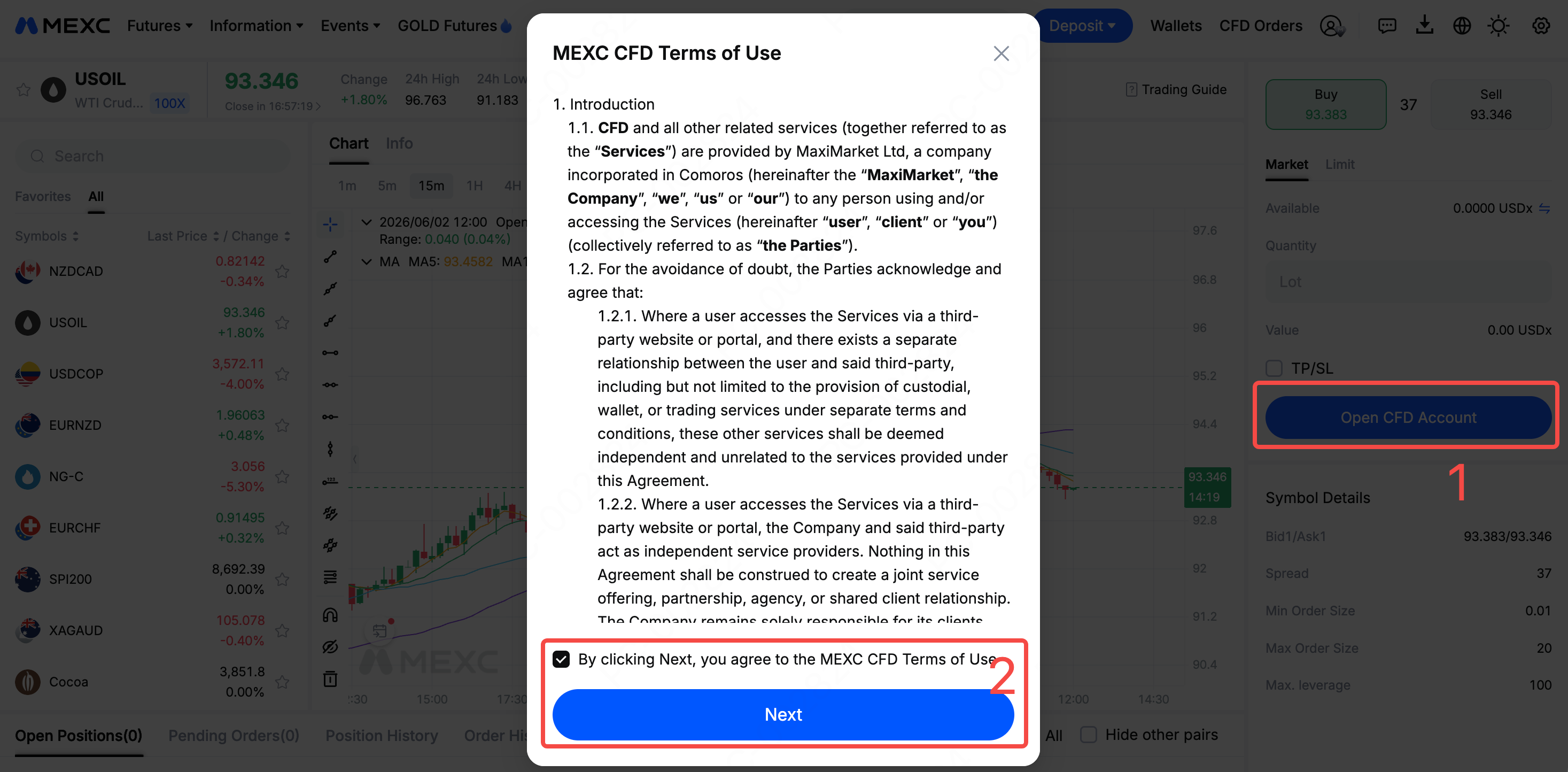
Log in to the MEXC website and open the CFD trading page through the homepage trending rankings, Markets, or Futures section. If this is your first time using the service, click "Open CFD Account." Carefully read and agree to the terms of use, then click "Next" to create your account.


Before creating your account, review these three requirements:

  • Identity verification: Complete Primary KYC verification before enabling CFD trading.
  • Account restrictions: Sub-accounts cannot open CFD accounts.
  • Regional restrictions: CFD trading is currently unavailable in certain countries or regions due to local laws and regulations. Availability is subject to the services offered on the platform.

Once your account is created, the system automatically generates your MT5 account details. You can trade directly on MEXC or log in to the MT5 client.

2.2 Transfer funds to your CFD account


After creating your CFD account, transfer funds before you start trading. Click "Transfer" on the trading page, select a transfer of USDT from your Spot account to your CFD account, enter the amount, and confirm. The system automatically converts USDT to USDx at a 1:1 ratio. USDx serves as the base currency for margin and settlement.


Once the transfer is complete, you can view "Balance," "Available Margin," "Used Margin," and "Unrealized PNL" in the order panel on the CFD trading page. USDx is used only for internal settlement within your CFD account. To withdraw funds, first transfer them back to your Spot account, where USDx is converted back to USDT at a 1:1 ratio.


2.3 View your MT5 account details and reset your passwords


Click your CFD account ID in the order panel on the CFD trading page to view your "MT5 ID" and "Server" details. Copy and save this information for use when logging in.

Before logging in to the MT5 client for the first time, reset your password. In the "CFD Account Info" window, click "Reset," set a new password, and complete security verification.

Your CFD account has two passwords. The "Master Password" allows you to log in and trade. The "Investor Password" provides read-only access to account information and cannot be used to trade. You can reset each password separately as needed.


2.4 Download the MT5 client


Find the MT5 download section at the bottom of the CFD page on the MEXC website. Select the version for your device, then download and install it. MT5 supports web and app access. Once installation is complete, you can log in to begin.


2.5 Log in to MT5 and start trading


Open the MT5 client and follow these steps to log in:

1) Search for and select the company: In the company search field, enter and select MaxiMarket Ltd. The corresponding server is MaxiMarket-MEXC-LIVE-1.

2) Connect to your existing trading account: Select "Connect with an existing trade account." In "Login," enter the MT5 ID you copied earlier. In "Password," enter your newly reset master password.

3) Log in and start trading: Check that your details are correct, then log in. You can now view real-time quotes and candlestick charts in MT5 and trade global assets such as gold, forex, and indices.


3. Important Risks to Understand Before Trading CFDs


Before you start trading CFDs, make sure you understand the following:

  • Trading hours: Traditional financial products have fixed trading sessions and close on weekends and holidays, unlike cryptocurrency markets, which operate 24/7.
  • Leverage risk: CFDs use fixed leverage of up to 500x, which users cannot adjust. Leverage magnifies potential returns but also significantly increases risk. Assess your risk tolerance carefully before trading.
  • Margin management: Liquidation is triggered when the margin ratio falls to 50%. Monitor your account's margin status closely.
  • Overnight fees: Positions held overnight incur swap fees, charged daily at 23:59 (UTC+3). The time adjusts automatically for daylight saving and standard time. Since markets close over the weekend, three days of swap fees are charged together on one day each week. Check the trading information for the applicable day.

4. CFD Trading FAQ


4.1 What does CFD mean?


A CFD is a derivative that lets traders trade an asset's price movements without owning it. Profit or loss is settled based on the price difference between opening and closing the position.

4.2 What is MT5, and how does it work with MEXC?


MT5 is a professional multi-asset trading terminal. MEXC integrates with MT5 to offer CFD trading. Users receive their MT5 login details after creating a CFD account.

4.3 How do I open an MT5 account?


Complete Primary KYC verification on MEXC, open the CFD trading page, and click "Open CFD Account." Agree to the terms of use to create your account. The system automatically generates your MT5 ID and server details.

4.4 What leverage is available for CFD trading, and can I adjust it?


The system sets fixed leverage by asset class, up to a maximum of 500x. Users currently cannot adjust it manually.

4.5 How do I fund my CFD account and withdraw funds?


Transfer USDT from your Spot account to your CFD account. The system converts it to USDx at a 1:1 ratio. To withdraw funds, first transfer them back to your Spot account, where USDx is converted back to USDT at the same 1:1 ratio.

4.6 What fees apply to CFD trading?


Trading costs include floating spreads, fixed trading fees, and overnight swap fees. Rates vary by asset type. For details, see the MEXC CFD Fee Schedule.

How to Open a MEXC CFD Account: From Account Setup to Trading on MT5

Key Takeaways:

  • Contracts for difference (CFDs) are derivatives that let users trade price movements in global assets, such as gold, forex, and stock indices, without owning the underlying assets.
  • MEXC integrates with the MT5 trading platform, allowing users to access traditional financial markets using USDT as margin.
  • Opening a CFD account requires Primary KYC verification. Once the account is created, users receive their MT5 login and server details.
  • Funds are transferred from the Spot account to the CFD account, where USDT is automatically converted to USDx at a 1:1 ratio for settlement.
  • After downloading and logging in to MT5, users can view candlestick charts, place trades, and manage positions.

1. What Are CFDs and the MT5 Trading Terminal?


A contract for difference (CFD) is a financial derivative that allows traders to trade price movements in instruments such as metals, indices, commodities, and forex without owning the underlying assets. Traders can take long or short positions to potentially profit from price differences in rising or falling markets.

MT5 is a widely used professional trading terminal that combines real-time quotes, candlestick charts, technical indicators, and order management. MEXC integrates with MT5 to support CFD trading. Users can create an account, transfer funds, and trade directly on MEXC without opening a separate account with a traditional broker. They can also log in to the MT5 client for a more specialized trading experience. Both MEXC and MT5 support candlestick charts for technical analysis.

2. How to Start CFD Trading on MEXC


2.1 Create a CFD account on MEXC


Log in to the MEXC website and open the CFD trading page through the homepage trending rankings, Markets, or Futures section. If this is your first time using the service, click "Open CFD Account." Carefully read and agree to the terms of use, then click "Next" to create your account.


Before creating your account, review these three requirements:

  • Identity verification: Complete Primary KYC verification before enabling CFD trading.
  • Account restrictions: Sub-accounts cannot open CFD accounts.
  • Regional restrictions: CFD trading is currently unavailable in certain countries or regions due to local laws and regulations. Availability is subject to the services offered on the platform.

Once your account is created, the system automatically generates your MT5 account details. You can trade directly on MEXC or log in to the MT5 client.

2.2 Transfer funds to your CFD account


After creating your CFD account, transfer funds before you start trading. Click "Transfer" on the trading page, select a transfer of USDT from your Spot account to your CFD account, enter the amount, and confirm. The system automatically converts USDT to USDx at a 1:1 ratio. USDx serves as the base currency for margin and settlement.


Once the transfer is complete, you can view "Balance," "Available Margin," "Used Margin," and "Unrealized PNL" in the order panel on the CFD trading page. USDx is used only for internal settlement within your CFD account. To withdraw funds, first transfer them back to your Spot account, where USDx is converted back to USDT at a 1:1 ratio.


2.3 View your MT5 account details and reset your passwords


Click your CFD account ID in the order panel on the CFD trading page to view your "MT5 ID" and "Server" details. Copy and save this information for use when logging in.

Before logging in to the MT5 client for the first time, reset your password. In the "CFD Account Info" window, click "Reset," set a new password, and complete security verification.

Your CFD account has two passwords. The "Master Password" allows you to log in and trade. The "Investor Password" provides read-only access to account information and cannot be used to trade. You can reset each password separately as needed.


2.4 Download the MT5 client


Find the MT5 download section at the bottom of the CFD page on the MEXC website. Select the version for your device, then download and install it. MT5 supports web and app access. Once installation is complete, you can log in to begin.


2.5 Log in to MT5 and start trading


Open the MT5 client and follow these steps to log in:

1) Search for and select the company: In the company search field, enter and select MaxiMarket Ltd. The corresponding server is MaxiMarket-MEXC-LIVE-1.

2) Connect to your existing trading account: Select "Connect with an existing trade account." In "Login," enter the MT5 ID you copied earlier. In "Password," enter your newly reset master password.

3) Log in and start trading: Check that your details are correct, then log in. You can now view real-time quotes and candlestick charts in MT5 and trade global assets such as gold, forex, and indices.


3. Important Risks to Understand Before Trading CFDs


Before you start trading CFDs, make sure you understand the following:

  • Trading hours: Traditional financial products have fixed trading sessions and close on weekends and holidays, unlike cryptocurrency markets, which operate 24/7.
  • Leverage risk: CFDs use fixed leverage of up to 500x, which users cannot adjust. Leverage magnifies potential returns but also significantly increases risk. Assess your risk tolerance carefully before trading.
  • Margin management: Liquidation is triggered when the margin ratio falls to 50%. Monitor your account's margin status closely.
  • Overnight fees: Positions held overnight incur swap fees, charged daily at 23:59 (UTC+3). The time adjusts automatically for daylight saving and standard time. Since markets close over the weekend, three days of swap fees are charged together on one day each week. Check the trading information for the applicable day.

4. CFD Trading FAQ


4.1 What does CFD mean?


A CFD is a derivative that lets traders trade an asset's price movements without owning it. Profit or loss is settled based on the price difference between opening and closing the position.

4.2 What is MT5, and how does it work with MEXC?


MT5 is a professional multi-asset trading terminal. MEXC integrates with MT5 to offer CFD trading. Users receive their MT5 login details after creating a CFD account.

4.3 How do I open an MT5 account?


Complete Primary KYC verification on MEXC, open the CFD trading page, and click "Open CFD Account." Agree to the terms of use to create your account. The system automatically generates your MT5 ID and server details.

4.4 What leverage is available for CFD trading, and can I adjust it?


The system sets fixed leverage by asset class, up to a maximum of 500x. Users currently cannot adjust it manually.

4.5 How do I fund my CFD account and withdraw funds?


Transfer USDT from your Spot account to your CFD account. The system converts it to USDx at a 1:1 ratio. To withdraw funds, first transfer them back to your Spot account, where USDx is converted back to USDT at the same 1:1 ratio.

4.6 What fees apply to CFD trading?


Trading costs include floating spreads, fixed trading fees, and overnight swap fees. Rates vary by asset type. For details, see the MEXC CFD Fee Schedule.